BigQuery
- Data encrypted with Data Encryption Keys DEK. Key Encryption Keys encrypt DEK
- Slot Time is the total elapsed time consumed by all parallel workers
- Consists of two separate BigQuery Storage and BigQuery Query services
- fully qualified:
Project.Dataset.Table - Under-the-hood: uses Colossus storage, Jupiter network, Dremel SQL execution engine, Borg compute facility
- Can ingest both bulk and streaming data
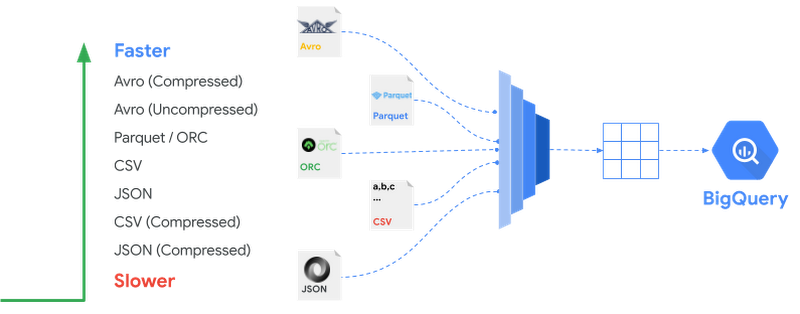
- BigQuery Query service can query external (aka Federated) data such as CSV, Avro, Parquet, ORC
- supports partition elimination of hive-partitioned files
- natively supports STRUCT and ARRAY, preferred over normalized tables
- DML queries results are cached for ~24 hours, if
- issued against native storage
- has no non-deterministic (eg CURRENT_TIMESTAMP, RAND etc)
- if the table isn't associated with Streaming Buffer
- new query compares exactly same as the saved query including white-spaces
- supports GeoSpatial or GIS data
- Pricing is similar to Cloud Storage, so no need to archive off BigQuery
- each table or a partition within a table that is not updated for 90 days, has cost similar to nearline storage
- two pricing models: per-query (~ 5$/TB scanned) or flat-rate (500 slots ~ $10,000/month)
- cached results (stored as temporary tables) are free
- Limit access to data by creating Authorized Views
- can't export data out of a view
- cost of storage and queries are separate and charged to respective users
- Time-travel (temporal) queries can access data up to 7 days ago by default
- deleted tables are kept for 2 days if not recreated with the same name
- Data Transfer Service allows scheduling data transfers
- Uses Connectors to source data, 100+ data sources supported
- Javascript UDF supported, but are not as optimized as SQL functions
- stored as dataset objects and can be shared
- Denormalized data that contain nested, repeated columns improve performance
- ARRAY as
mode(where NULLABLE is specified) to implement repeated fields - STRUCT as
typeto implement "pre-joined" data - Nested data can be flattened using correlated-join and/or UNNEST
- batch loading is not charged, but loading by streaming is charged
- insert rate of 100K/sec; if dedup is disabled, BQ in USA can support 1 million rows/sec inserts
- BQML supports only
linear_regandlogistical_regmodels - BQML EVALUATE measures effectiveness of model
- BQML
SELECT * FROM ml.PREDICT(MODEL <model>, <query>)for predictionSELECT * FROM ml.EVALUATE(MODEL <model>, <query>)for model evaluation- Data transfer service available with connectors for Teradata, Redshift, S3 and google sources
- cost control: Use GCP quotas to limit how many TB can a user process in a day etc
- nested array of struct is like a sub-table
- more efficient than join
- can be up to 100MB/ row
- BP: best used for identifying, immutable parent-child relationships
- BP: split-able compressed row-oriented formats are faster (compressed
avro> compressed csv) - Data ingestion is free, except when loading using federated queries, which does use query capacity
information_schemacontains metadata about jobs, users, datasets, tables, views, routines- Queries can be run interactively or in batch. Interactive queries count towards concurrency and daily limits
SQL
ARRAY_AGG([DISTINCT] <COL> [ORDER BY <COL>] [LIMIT <n>])withGROUP BYturns the specified items form group into an ARRAYFROM <tbl> UNNEST(<fld>) as hturns array into rowsCROSS JOINwith fields in arrays of nested struct is correlated- e.g.
SELECT race, participants.name FROM racing.race_results AS r, r.participants ANY_VALUEselects any one value when using SQL expression:SELECT A, (SELECT ANY_VALUE(B) FROM T2 WHERE T2.Y=T1.X) FROM T1- Use
OPTIONS(partition_expiration_days=60)to auto-expire partitions SELECT STRUCT("Rudisha" as name, [12.8, 23.4] as split) as runnercreatesrunnerasRECORDtype withsplitasARRAYtypeSELECT date, ARRAY(SELECT AS STRUCT title, score FROM UNNEST(titles) ORDER BY score LIMIT2) AS top_articles FROM TitlesAndScores- above uses
ARRAYconstructor with SQL on a repeated field to produce a newARRAYfield
Performance
- materialize query into a table
- enable query caching since it's free
- query results are cached per user, per project
- minimize the number of columns read
- minimize number of times expensive computations are done (eg. ST_Distance)
- Use BI Engine that can cache some results in memory for applications like Data Studio (avoid query BQ query charges)
- Denormalize instead of joins
- use fewer passes to read data, using expressions instead of joining large tables
- use GROUP BY first then JOIN instead of the other way around
- use window function instead of self join
- try not overwhelm one worker, instead distribute work over many workers, e.g.
ROW_NUMBER() OVER(ORDER BY C1)can use only 1 worker, whereasROW_NUMBER() OVER(PARTITION BY C2 ORDER BY C1)will use many- Reduce data skew; try to distribute data on more workers, e.g. by making GROUP BY more granular
- e.g.
GROUP BY A, Bis faster thanGROUP BY A
- e.g.
- For large data, use
APPROX_*over their exact counterparts, eg.APPROX_COUNT_DISTINCToverCOUNT(DISTINCT x) JOIN: put the largest table on the leftGROUP BYlow cardinality is better than high cardinality- can require users to supply a partitioning query
- avoid using UDFs written in javascript, which requires Java subprocess (concurrency limit dropped to 6 from 50)
- clustering: order is important, won't use clustering if higher order columns aren't supplied
- Explain
- Each Stage shows: Wait, Read, Compute, Write times and Rows read, Rows written.
- each time bucket has color, and each bucket has gradation.
- paler grade: total time, darker grade: average time, less dark: max time amongst all shards
- for skewed operation, max gradation will be much longer than average (long tail)
- split skewed queries into two, one just the skewed value and the other is everything else
- shuffle (redistribution) happens when mapping from stage N to N+1 isn't statically determined
- is used when joining two large tables
- broadcast join is used when joining small table to a large table
- explain shows
each with all(v/seach with eachwhen join is a shuffle join)
- explain shows
- Each user has shuffle area limit (~2TB)
order bylarge tables can run out of memory because master node needs to sort the values.- use
order by ... limit <n>to have BQ optimize large sort to partial sorts - prefer
GENERATE_UUIDorSHA256overROW_NUMBERto generate surrogate-key ROW_NUMBERputs every row in a single partition- BQ uses fair-scheduler, ie each stage can use all available slots if needed
- number of available slots are defined at project level
- hierarchical slot reservation allow per project to prioritize certain workloads
- unused slots by higher priority projects can be used by lower priority queries, but can be preempted
- BP: segment users into different projects based on roles, e.g. data science team can be in a project that has fewer slots
| Features | Partitioning | Clustering |
|---|---|---|
| implementation | physical datasets | data sorted within partition |
| usage | ingestion time, date-time or int col | 1+ columns |
| Suitable for cardinality | Low (<10K) | high |
| query pricing | exact | best effort |
| Data management | like table (auto-expire) | DML |
Security
- IAM replaces SQL DCL
- Permissions:
bigquery.jobs.{create,list}to {run,list,cancel} jobs (including queries)bigquery.{dataset,table,routines,model}.{create,list,delete}- Roles may apply to organization, project, dataset, table/view
roles/bigquery.dataEditor:- on tables/views: update data, metadata or delete the table/view
- on dataset: above + create,list tables, read dataset metadata
roles/bigquery.dataOwner: above +- on tables/view: + share
- on dataset: + update,delete dataset
- on project/org: create new datasets
roles/bigquery.dataViewer:- on tables/view: read data and metadata
- on dataset: read metadata, list on dataset + read tables/view
roles/bigquery.jobUser: min. level project, run queries- Authorized Views: simulate row and column level security
- On table, add ACL
ALLOW VIEW <view> - supports secured VPC: e.g. can't export data out of VPC etc
- Encryption:
AES_DECRYPTscalar function allows each value to be encrypted by a different key
bq
- show table metadata:
bq show bigquery-public-data:samples.shakespeare - run query:
bq query --use_legacy_sql=false <file> - list your datasets:
bq ls - list datasets for a project:
bq ls <proj>: - list tables:
bq ls <dataset> - create a new dataset:
bq mk <dataset> - load and create table:
bq load babynames.names2010 yob2010.txt name:string,gender:string,count:integer
Data Studio
- Has two levels of cache query cache (from BigQuery) and prefetch cache (from Data Studio)